Train Simulator Classic - Developer Update Part 4
May 21, 2024
We catch up with Senior Producer Steve Dark to get an update on development ready for the launch of Train Simulator Classic 2024.
As we have now completed Phase 2 of the Train Simulator Classic Development Plan, we wanted to reflect on the past year and then outline our objectives for Phase 3.
As I’m sure you’ll remember, our overall objective for Phase 2 was all about improving performance in terms of increased FPS plus some administrative tasks aimed at sorting out our build process and investigate retiring the 32-bit edition of core.
We will preface this article with a caution that at some point, or even several points during this article, things will get technical and might use terms you won’t know unless you’re a programmer. That said, there should be enough useful information that will enable you to draw a conclusion without needing to understand all the programming lingo. As always, if there’s anything you would like to understand more about, you can ask on our forums through the link at the bottom of this article.
SilverLining
One area we focused on is the 3D Skies plugin, better known as SilverLining. We know that since its implementation, it has had a deleterious effect on performance to the point that many people turn the feature off in the hope of clawing back some framerate. So, we started with that and, managed to upgrade to the latest version which has been improved over the last 6 years or so since it was introduced and now runs much better than it did. Yes, it still affects framerate but, our tests have shown there is a marginal reduction in lost framerate. This can only be a good thing. The only problem was, dependent on the user’s PC, the improvement is only likely to be noticed by those on more powerful PCs.
We did, however, help the developers of SilverLining find and trace a bug in their code that had existed for a while. Whilst the bug would have only been experienced in very specific and extreme cases, it was still satisfying to contribute to improving their code.
Public Beta
We also kicked off our Public Beta. A chance for you all to get involved in testing our latest and greatest fixes and improvements as they were being made. This has been the single biggest source of information for us and has been invaluable in finding and tracing problem areas. So, to say it was a resounding success is an understatement! With your help, we were able to find and fix some really annoying issues that had plagued the software for some time and, while we still have some things to look at, we are seeing even more players jumping on-board the Beta. Saying thank you for all your help and taking part in the Public Beta just doesn’t seem to be enough but I hope you will all go away at the end of the whole process knowing that you contributed to the software in a meaningful way, even if just a small part of it. Every contribution is felt by everyone past, present and future.
User Interface
Fixing the display resolutions issue in a roundabout way was also something we investigated and partially resolved. Unfortunately, we weren’t able to fix this in the way we wanted to, which I’ll get to in the next paragraph. We went over some of the resolutions that were being presented and decided that it was unnecessary to have some of the lower resolutions in this modern age. The 640x480p resolution seemed to be a bit of a holdover of yesteryear’s era displays that had no place today so, we removed that and set the default base resolution to 800x600p.
One area we wanted to resolve was the resolutions running off the bottom of the display in some situations. Unfortunately, this required us to edit the user interface and it is there that we ran into a problem. Train Simulator utilises something called Scaleform, which is responsible for the user interface or UI for short. Scaleform is owned by Autodesk, the same company that also develops and maintains 3D Studio Max or 3ds Max as it’s known today – the industry standard 3d design software in the games industry. A few years ago Autodesk discontinued support for Scaleform and numerous attempts to get access to the source code to resolve resolution issues were unsuccessful.
Instead, we were able to change the type of list box that is used to show the list to something else and that was sufficient to stop the list from running off the edge.
The lack of available source code and SDK meant we were also not able to do the work on improving the Content Management System. As part of our investigation into what is causing the problem with the UI being so slow when you have a lot of content installed, we discovered that most of this work is done in the UI. Scaleform uses what is called ActionScript so that it can perform all the functions needed for the UI to be able to carry out the tasks you ask of it. So, when you click a button or click a scenario, it does what you expect it to do. Without this ActionScript nothing would happen when you clicked on anything. It also means that Train Simulator relies on the Scaleform ActionScript to index all your content.
Performance Improvements
Moving on to the performance improvement aspects where we wanted to improve frame rates for players. Train Simulator was written in a time before multi-core CPUs became available and therefore didn’t support multithreading. It is likely that no-one ever thought Train Simulator would go on for as long as it has. Most games’ lifetimes are comparatively very short. Train Simulator also doesn’t take full advantage of the resources available in modern PCs and is, on that basis, fundamentally performance limited. CPU development has also had an impact here that instead of building and improving single-core performance, as was historically the case, the designers and manufacturers went a different route and opted for spreading the load across multiple cores instead of just making the single core faster. When you think about it and translate that into an analogy, having multiple people do a job is certainly faster than having one person just work faster. It is also much more efficient. So, upgrading to support multithreading was something we really wanted to explore.
Our key aim for the improvements were exploring whether we could add multithreading in either a ‘top down’ (allowing some subsystems to operate in parallel) and ‘bottom up’ (whether performance intensive tasks can be made to use parallelism). We also wanted to look at whether we could offload some tasks to the GPU rather than have it all handled by the CPU. Finally, we also wanted to look for areas of unoptimized code that may be hampering performance.
So, for our purposes, we selected an intensive candidate route where we could peek ‘under the hood’ to understand where the framerate was being spent. We were certainly not short of options here but selected the Portsmouth Direct Line: London Waterloo to Portsmouth route. One of the key advantages of our earlier work in upgrading to Visual Studio 22 was that newer versions of Visual Studio includes some useful profiling tools. These are tools we can use to see exactly how the code is performing but also, highlight any areas that weren’t performing particularly well.
We generated a flame graph with the profiling tools, see the example below which is a real flamegraph of the WinMain function from Portsmouth Direct Line.
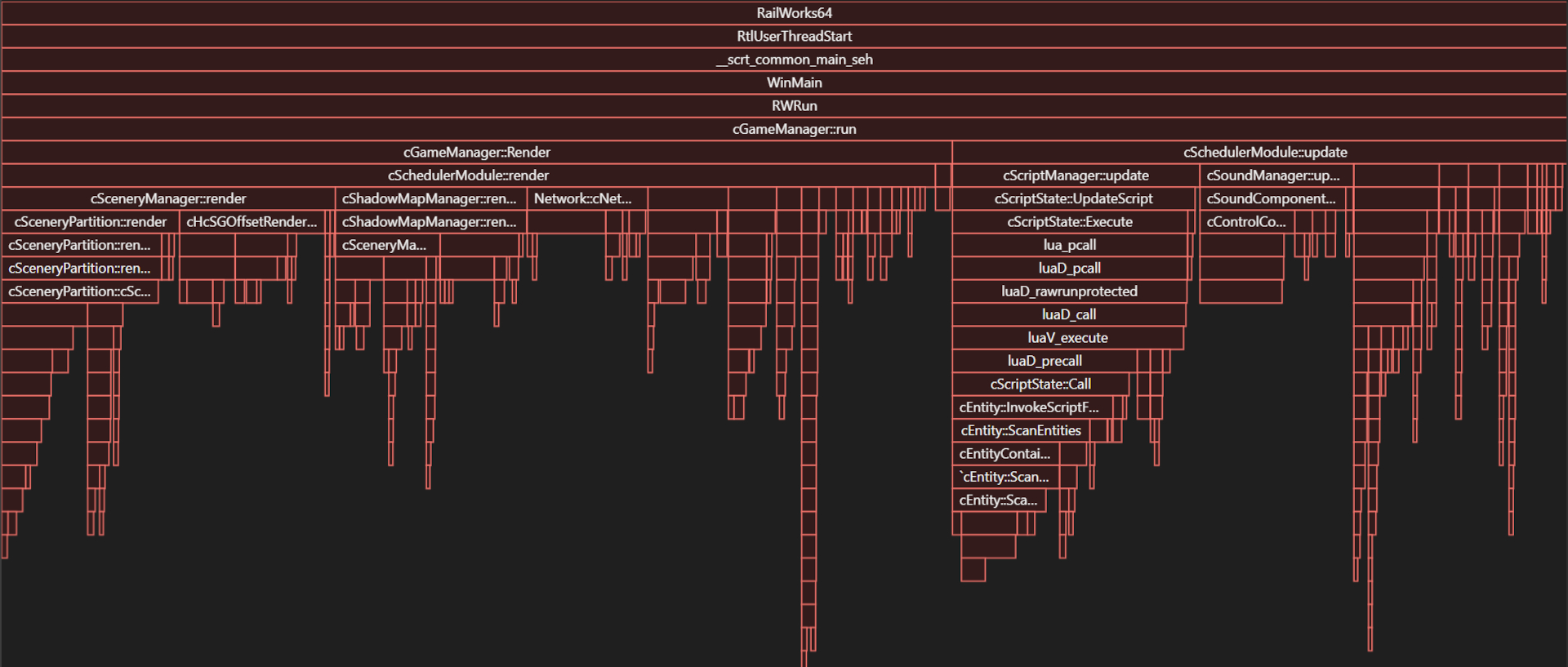
Looking at the flamegraph, if you’ve never seen one before, it makes very little sense. However, the key things to note are each cell represents specific functions from the code that are being used. The wider the cell is, the greater the CPU time that function is consuming. Functions that are good candidates for optimisation are those that are represented by wide bars in the graph but, with child functions that are much smaller which indicates that the parent function contains most of the CPU time.
One example in the graph above is the third function from the left, on the ninth line. The text is truncated so the full name of the function cannot be read but it is Network:cNetworkGeometry::renderGeometry.
In the case of this specific function, as is the case with so many functions in the code that consume large amounts of CPU Cycles, there are few optimisations that can be made to improve the situation. With the rendering of network geometry, the sheer amount of geometry in this route, coupled with the fact that data is store and accessed inefficiently by design, options are particularly limited without a radical overhaul of the engine.
One of the unbreakable rules we set from the outset is that we needed to maintain as much compatibility with the content as possible. You told us that it was important to you that we not break how you use this content so, it was important to us too that we make this rule unbreakable. Because of this specific rule, it meant we couldn’t make any systemic change to the code without breaking stuff in the process.
Referring to the flame graph, you can see there are two main phases of each frame in Train Simulator – Render and Update. During the Render phase, the application iterates through all of the geometry required for the current frame and sends this to the rendering engine (Direct3D 9, largely by way of the Heracles API). During the update phase, the application performs all the game logic, such as physics, audio and, script functions.
If you’re following along with this and are not a programmer, you may be wondering what an API is, among other things. Essentially, an API is a way for two or more computer programs or components to communicate with each other and defines how they talk to one another using requests and responses, almost like a contract of service.
The architecture of Train Simulator, and the fact that the codebase has evolved over more than 20 years, assumptions have been made in both the original code, and subsequent updates. The result is that none of the code has been written with the concept of multi-threading or multi-core support in mind. For example, Lua scripts can access any entity within the game, and manipulate objects, including invoking other scripts. This behaviour means that scripts must be run in series, and the largest phase of the update loop cannot be run in parallel.
In addition to this fundamental lack of thread safe programming in the scripting engine, and because most of the scripts need to interrogate other objects (i.e. entities) in the scene, each script regularly performs multiple entity lookups per frame. This is problematic because the entity lookup is both slow and called thousands of times per frame.
Almost all the data in Train Simulator is dynamic – objects are instantiated at runtime via the Blueprint data and the serialisation engine (Delta); and data is designed to be manipulated at runtime via the in-game editor. When one object (for example a Lua script) needs to talk to another object (for example a control in a rail vehicle) a lookup must be performed to find the appropriate object. Because the data is dynamic, most of the references to these entities cannot be cached. In routes and scenarios with tens of networks and rail vehicles, each of which may have hundreds of controls, or sounds, these lookups are performed all the time.
Since entities can themselves have child entities, and because they are referenced by their name, each lookup can result in a recursive case-insensitive string search through hundreds of objects. In the Portsmouth Direct Line scenario we used for performance testing, 25% of the update portion of a frame (approximately 10% of the whole update) was spent performing these entity lookups.
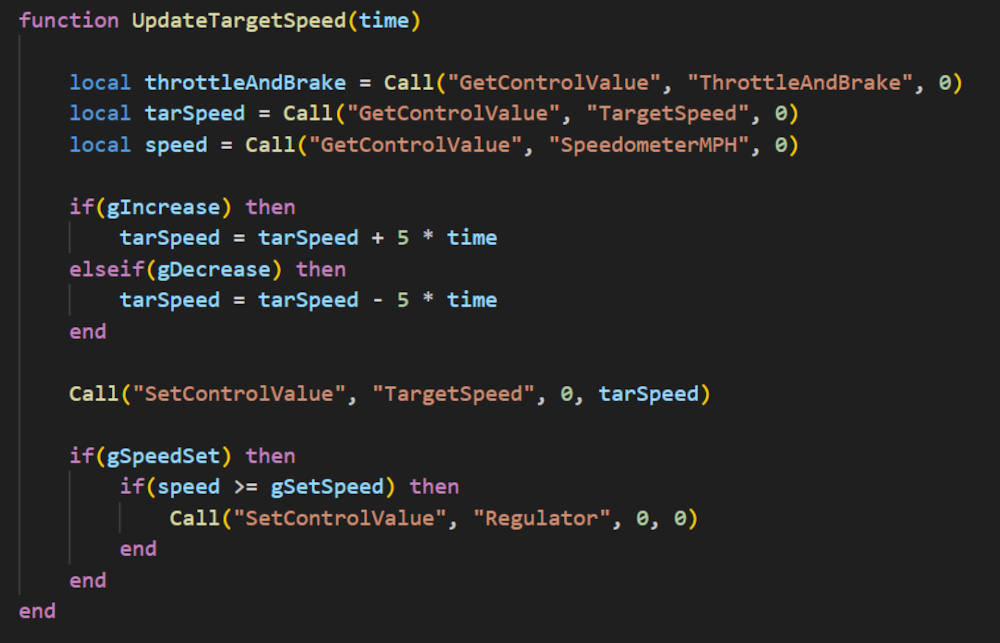
The above snippet of code is taken from a script used in the same route/scenario combination and contains examples of this lookup.
The Call function in this code snippet is used to run a function within the C++ game code, and in these cases one of the parameters is the name of a control. The script manager performs an entity lookup using this string, and then calls the internal function, before sending the returned value back to the Lua code.
It can be seen from examining this code, that of these five entity lookups, the throttleAndBrake call is not necessary, since the return value is never used. Additionally, there are some situations where none of the other lookups are necessary. The script can be optimised to the following, retaining the same functionality but only performing the minimum number of entity lookups.
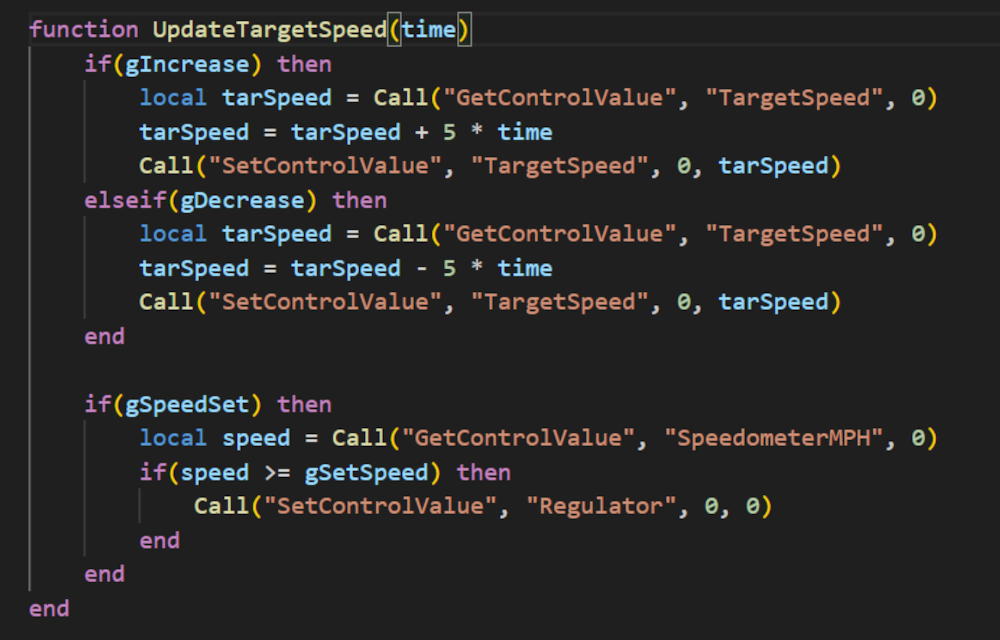
This is just one example from one script used in this particularly route. Many such instances exist. Given that the entity lookup is inherently slow by design, optimisation options in the C++ code are limited. As noted above, because these entity lookups can themselves run scripts, or manipulate objects, running them in parallel is not feasible.
In general, the only approach to optimising these issues is to optimise the Lua scripts. However, to set expectations, in this example, 25% of the update time is spent on these lookups. Even if every lookup was removed by optimisation, this would only equate to a 3 frames-per-second improvement on a 30 frames-per-second scene.
The flame graph also helped us to understand which areas were the most demanding and if we focused our efforts there, optimisation in those areas would mean potentially modest gains in terms of performance. These areas are Scripts (which we went into above), Ribbons, Audio and Passengers.
Ribbons is essentially the internal name for things like fences, hedgerows, roads, track, etc. anything that is essentially just a continuous spline. Most people know these things as lofts and we’re not talking about the thing at the top of your house.
A loft is particularly special because it is formed from a mathematical equation rather than using physical parameters. This equation determines the shape of this line as well as the position of the start of the line and the position of the end of the line. To use an analogy, think about model railways, a loft would be a piece of flexible track which can be bent and manipulated into specific shapes. To make a curve, you would position the start and end of the track to give you the result you’re looking for instead of placing down individual curved sections of track. It’s roughly the same principle.
Lofts are particularly performance intensive, and we’ve known this for a long time so, it was something we really wanted to dig into and understand why and if we can do anything to make them less performance intensive. Unfortunately, the answer there was no. Everything we tried we ran into problems with non-thread-safe code so, it was literally a bust and we moved on to the next thing in the list – audio.
This is where we run into the unbreakable rule 2. You told us that sound plays an important role in your experience, that you specifically use some content because it has good sounds. We can certainly appreciate those points so, any changes we needed to look at on the audio side again had to conform not only to the first rule but also the second rule in that we cannot impact or impede the perceptual quality of audio when it comes to trains particularly.
The sound engine update is extremely CPU intensive, taking up to 25% or more of the update time (equivalent to all the LUA scripts combined in a single route). Whilst we did trial a few improvements here and there, we ended up reverting almost all of those changes because they fundamentally impacted the quality of the experience which we just knew you would not be happy with. The ones we ended up sticking with were the ones that made the existing functions work better, such as speeding up the sound look ups and increasing the pre-allocated size of various hash tables.
Moving on to Passengers, we noted that when the visibility of a passenger changes, a lookup is performed to find the character model, and a call is made into the renderer. However, this happens even if nothing has changed. This therefore adds to the overall performance hit so, we added a means for the game to exit out of this update early if nothing has changed.
The optimisations that have been implemented, when combined, can result in some moderate performance gains. In some specific situations, in particular combinations of routes, scenarios, rail vehicles, cameras, etc. gains of 10 to 20% have been observed but this is also very much dependent on the combination of CPU and GPU used.
The chosen graphic settings can also have a massive impact on performance. As noted above, the network rendering can be very slow. When shadows are enabled the number of networks that the renderer iterates over can double, having a huge negative impact on performance in some locations and negating any gains from these moderate changes.
Rounding out this section of the article, performance has been a bit of a quest for us. We went into it wanting to be thorough and try as hard as we could to deliver something that you can see and feel every time you play a scenario. Whilst we haven't been able to achieve all of what we set out to do, for good reasons, we have been faithful to our word that it's been a thorough exploration of where we can realistically add value. Those areas that we could improve, without breaking our unbreakable rules, have been implemented and we hope that you will see this at least in some form when you come to play. Unfortunately, parallelisation and multi-core support on a complete level is too risky to implement. It would also fundamentally alter how the game works - which no-one wants. To us, doing anything that would diminish the software’s capabilities in any way both in terms of what it can do but also in what you do with it, was something we weren't willing to compromise on.
64-bit Tools
Finally, we wrap up the bulk of this reflection over the last year with completing the 64-bit tools. These new tools expand on the tools that the Blueprint Editor utilises when exporting content and offer some specific advantages over their 32-bit counterparts in the form of better memory use and allocation, able to work with much bigger files, etc. See our patch notes (link below) for more information on this.
Phase 3
Moving on to Phase 3, our aim with this phase is to spend some time working on some really annoying bugs that have been around for a long time. We will need to timebox this work (a way of saying we need to set some limits to avoid costs spiralling out of control) which is likely to mean we won’t get to everything.
We have used your and our partners’ feedback to help us come up with a list of things we want to look at specifically, and we’re hopeful that in amongst that list of things we will fix the most important bugs.
The above may not sound like a lot but, there are some really complex issues that will need to be unravelled – a bit like attempting to unravel a rope or wire that has got itself into knots. So, we will need the time to work on them.
Thanks to everyone who has helped during the Public Beta over the past months, this has been invaluable to get to the improvements and fixes in today's big update. If you have any feedback or questions on anything in here, or the previous developer updates, let us know in the forums. We’ll be back with another update as we approach the launch of the next Public Beta.
- Train Simulator Classic 2024 Patch Notes
- Developer Update Part 1
- Developer Update Part 2
- Developer Update Part 3
